1. Introduction Link to heading
This laboratory consisted of two main activities: setting up a personal academic blog using Hugo and exploring reinforcement learning with Unity ML-Agents.
The first activity focused on creating a functional website for documenting HCI coursework. The second involved configuring a Unity reinforcement learning environment, developing a new agent task, training a policy, and evaluating its performance.
Throughout the laboratory, several technical problems occurred, including Hugo content parsing errors, Unity installation issues, dependency compatibility checks, and difficulties evaluating reinforcement learning performance.
This report focuses on the implementation process, the problems encountered, the solutions applied, and the results obtained.
Part I — Hugo Blog Setup Link to heading
2. Objective, Tools, and Site Structure Link to heading
My first objective was to establish a reusable academic blog for HCI homework, laboratory reports, and reflections. The current project uses Hugo Extended 0.167.0, the hugo-coder theme, Markdown, Git, and GitHub Pages. Its configured public address is Lu’s Blog.
The local structure separates responsibilities:
| Location | Purpose |
|---|---|
hugo.toml |
Site title, theme, base URL, navigation, and Markdown settings |
content/posts/ |
Articles and coursework sections |
themes/hugo-coder/ |
Theme, tracked as a Git submodule |
layouts/ |
Local template overrides, including mathematics support |
static/images/ |
Images copied into the generated site |
public/ |
Generated HTML used by the deployment workflow |
The theme submodule is present in the initial repository commit of 29 September 2026. The site configuration selects hugo-coder and includes the GitHub Pages project prefix, /myblog/, in its base URL. That prefix matters: a resource path that works at a domain root may fail below a project directory.
I retain the existing Posts and HCI navigation. This laboratory report is an ordinary post, without another top-level menu entry. The first HCI homework article and later coursework remain separate.
3. Front Matter: A Persistent Parsing Problem Link to heading
The first HCI article was prepared at content/posts/hci-homework-1.md. The initial troubleshooting account records this repeated diagnostic:
13:8: unexpected character U+005C '\'
Another symptom was that metadata appeared as ordinary webpage text. These were different failures: a parser error prevents Hugo from reading a file, whereas visible metadata suggests that the intended header was not recognized as front matter.
One early suspicion concerned the timestamp:
date = 2026-09-29T16:49:27+02:00
However, an unquoted offset date-time is valid TOML. Hugo’s front matter documentation uses the same form, and a separate TOML parser accepted this timestamp during the review. I therefore cannot identify the timezone offset as the cause.
The investigation focused on the opening and closing delimiters, the metadata syntax, and the boundary between header and body. TOML uses +++ and equals signs:
+++
title = "HCI Homework 1"
date = 2026-09-29
draft = false
+++
YAML instead uses --- and colon-separated fields:
---
title: "HCI Homework 1"
date: 2026-09-29
draft: false
---
A clean article file with recognizable front matter, followed by inspection of the generated page, resolved the setup problem. The available record does not preserve the exact file-generation command or the final character-level correction.
What Can Be Recovered from Git Link to heading
The earliest committed Homework 1 file, commit 716fbac, already has a delimited TOML header. At line 13 it contains an escaped Markdown heading, \# Lecture 1: Affordances. The later commit of 1 October, e44ab94, contains a clean header and an ordinary Markdown heading. The present file builds correctly.
This is useful evidence, but it is not a complete reconstruction of the failure. The escaped heading is in the body; its presence does not prove that it caused the reported TOML error. Neither the original failing file nor the complete parser context was preserved in the available history. The metadata-as-body symptom comes from the troubleshooting account, rather than a committed failing version. I therefore do not present the timestamp, the escaped heading, or a guessed delimiter edit as a confirmed root cause.
The lesson was to distinguish a suspicious line from a demonstrated cause, and to inspect both terminal diagnostics and the rendered webpage.
4. Preview, Mathematics, and Deployment Link to heading
A local development server provides a preview before publication:
hugo server
The current GitHub Pages workflow checks out the repository, uploads public/, and deploys that artifact. It does not run Hugo itself. Site generation and deployment are therefore separate steps: generated HTML must be prepared before the workflow can publish it. The Pages workflow was introduced on 29 September, and the subsequent coursework commits show the blog being reused.
For equations, I reused the existing Homework 2 solution. Goldmark preserves mathematics delimiters, and a page-level math = true flag enables the existing KaTeX partial. This report did not require a new global mathematics configuration. Its images occupy a separate static directory, and their URLs include the project prefix.
I checked this article through a local build and browser preview. This preparation did not trigger a deployment.
5. Hugo Setup Results Link to heading
The Hugo activity established a functional structure for academic writing and a configured GitHub Pages deployment route. Its main lesson was that source files, parsing, browser rendering, and deployment require separate checks. A successful build alone does not establish that an image or equation is visible.
The new laboratory article follows the existing site style and leaves the homework articles intact. It also avoids duplicating coursework entries in the top navigation.
Part II — Unity ML-Agents Reinforcement Learning Experiment Link to heading
6. Objective Link to heading
The objective of the second activity was to explore reinforcement learning through Unity ML-Agents and extend the basic framework to a new interactive situation.
The selected task was Moving Target Challenge.
In this environment, a spherical agent must learn to pursue a moving target inside a bounded arena.
Unlike a stationary-target task, the target continuously changes position. The agent must therefore learn to react to both its own movement and the target’s motion.
The experiment involved environment design, agent implementation, reward definition, PPO training, and independent performance evaluation.
7. Development Environment Link to heading
The experiment used the following software:
| Component | Version or configuration |
|---|---|
| Unity Editor | 6.0 LTS, 6000.0.85f2 |
| Rendering pipeline | Universal Render Pipeline |
| Unity ML-Agents | 4.1.0 |
| Python | 3.10.12 |
| Python ML-Agents | 1.2.0.dev0 |
| PyTorch | 2.8.0+cpu |
| Reinforcement learning algorithm | PPO |
| NumPy / Protobuf / ONNX | 1.23.5 / 3.20.3 / 1.15.0 |
| Model export format | ONNX |
The Unity package and Python environment were checked for compatibility before training.
Both sides used ML-Agents communication protocol version 1.5.0.
8. Problems Encountered During Environment Setup Link to heading
8.1 Incomplete Unity Installation Link to heading
An earlier Unity 6000.6.6f1 installation was incomplete: a substantial Data directory remained, but the Editor executable was missing. Its registry entry also pointed to an unavailable C: drive path. I stopped treating the installation record as proof that the Editor was usable and selected Unity 6.0 LTS instead.
The replacement executable was verified at:
D:\HCI_Lab1\UnityEditor\6000.0.85f2\Editor\Unity.exe
Its product version was 6000.0.85f2, its digital signature verified as Unity Technologies SF, and the official -version command returned the expected version with exit code 0. Core libraries, Mono, Package Manager, and Windows build support were also checked. The version command did not by itself establish GUI or license readiness; these were separate checks before project development.
The final Editor and experiment files are on D:. The old C: drive download directory was later found to be empty, but the exact cleanup operation was not recorded. I do not attribute that cleanup to the earlier deletion attempt, which failed with an access-denied error, or claim that the old D: drive residual installation was removed.
The new installation supported the Universal 3D project named MovingTargetChallenge. This resolved the missing-Editor problem without relying on the incomplete installation.
8.2 Python and Unity Package Compatibility Link to heading
Problem
Unity ML-Agents contains separate Unity and Python components. Their version numbers are not necessarily identical, which can make compatibility verification confusing.
The Unity package version was 4.1.0, while the corresponding Python package reported version 1.2.0.dev0.
Simply comparing these two version strings was insufficient. I checked the official release/4.1.0 package definitions and Python source pinned to commit 4cd1badf62d9663fcab12fc278b2dab4d3c9209e. That source declares Unity package 4.1.0 and Python packages 1.2.0.dev0; the Unity package requires Editor 6000.0 or later.
Solution
The Python environment was isolated at D:\HCI_Lab1\mlagents-env, rather than forcing the required versions into the existing Python environments.
The Unity package was installed through the official Unity Package Manager registry.
Compatibility was checked using the package definitions, dependency versions, and communication protocol.
The Python environment was also tested for successful imports and CPU computation; pip check found no broken requirements.
Result
The Unity package was resolved successfully, and the project compiled with:
- 0 C# errors.
- 0 C# warnings.
The required ML-Agents classes, including Agent, BehaviorParameters, VectorSensor, and ActionBuffers, were available.
Actual Unity–Python communication was subsequently verified during the training stage.
9. Moving Target Challenge Environment Link to heading
9.1 Scene Design Link to heading
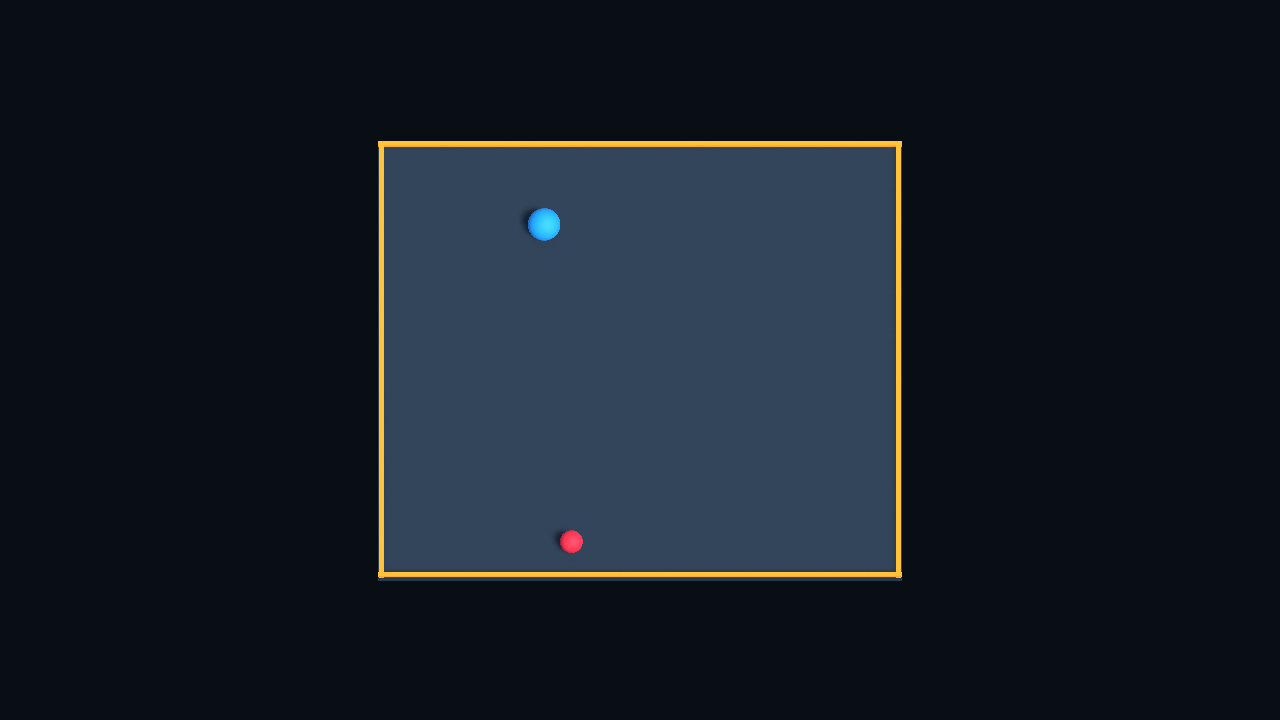
Figure 1. The actual Moving Target Challenge scene, captured through URP rendering. The visible borders mark the bounded arena.
The environment consists of a square arena, a blue spherical agent, and a red moving target.
The arena has visible boundaries, a ground plane, lighting, and a camera. It is saved separately as Assets/Scenes/MovingTargetChallenge.unity; SampleScene is preserved. A repeatable Editor generator creates the scene and URP materials.
The target has a kinematic Rigidbody and a trigger collider. It moves at constant speed between reflections; at a boundary, the relevant velocity component reverses while preserving the remaining displacement.
At the beginning of each episode, the agent and target are assigned new positions, with a minimum separation to avoid immediate capture. The agent’s linear and angular velocities are cleared, and the target receives a new direction.
The main parameters were:
| Parameter | Value |
|---|---|
| Arena size | 16 × 16 |
| Agent position limit | ±7.5 |
| Target position limit | ±7.4 |
| Agent acceleration | 18 |
| Agent maximum speed | 6 |
| Target speed | 1.5 |
| Minimum initial separation | 4 |
| Capture distance | 0.95 |
| Physics timestep | 0.02 s |
| Maximum episode length | 2,000 physics steps, approximately 40 simulated seconds |
9.2 Observation Space Link to heading
The agent receives eight continuous observations:
| Observation | Dimensions |
|---|---|
| Agent horizontal position | 2 |
| Relative target position | 2 |
| Agent horizontal velocity | 2 |
| Target horizontal velocity | 2 |
| Total | 8 |
The observations are normalized to the range [-1, 1].
The agent’s own position provides information about its proximity to the arena boundaries.
Relative target position and target velocity provide information relevant to pursuit.
9.3 Action Space Link to heading
The agent uses two continuous actions to control movement along the horizontal X and Z axes.
The combined horizontal action magnitude is limited to one before the velocity update. The agent Rigidbody is constrained to horizontal movement, and the implementation caps its maximum speed.
A Decision Requester requests a new decision every five physics steps, with the selected action repeated between decisions. At a 0.02-second physics timestep, this corresponds nominally to a new decision every 0.1 simulated seconds.
A keyboard-based heuristic controller was also implemented for manual testing.
9.4 Reward Function Link to heading
The reward mechanism was designed to encourage the agent to approach the target while discouraging inefficient movement and boundary violations.
The distance-based reward was defined as:
\[ r_{\mathrm{distance}}=0.02(d_{t-1}-d_t) \]where \(d_t\) is the distance between the agent and target at the current step.
Additional rewards and penalties were:
| Event | Reward |
|---|---|
| Approaching the target | Positive distance-change reward |
| Moving away from the target | Negative distance-change reward |
| Each physics step | −0.0005 |
| Capturing the target | +1 |
| Leaving the arena | −1 |
Capturing the target or leaving the arena ends the current episode. The 2,000-step limit truncates an episode that has not otherwise ended. Capture is defined by horizontal distance, not physical contact.
Reward is accounted for once per physics step, not only when a new decision is requested. The previous-distance value is reset at episode initialization so that reset jumps are excluded.
The complete reward can be written as:
\[ r_t=0.02(d_{t-1}-d_t)-0.0005+\mathbf{1}_{\mathrm{capture}}-\mathbf{1}_{\mathrm{out}}. \]An approach-and-retreat check found no net positive undiscounted distance-cycle reward. This rules out one simple exploit; it does not prove that every undesirable strategy is excluded.
10. Implementation and Testing Problems Link to heading
10.1 Verifying the Generated Scene Link to heading
Problem
A Unity scene can compile successfully while still containing incorrect component references, unsuitable physics settings, or runtime problems.
Therefore, successful compilation alone was not considered sufficient.
Solution
The scene components and scripts were checked before runtime testing.
The checks included the observation dimensions, action dimensions, component references, target movement, episode resets, and reward calculations.
The scene was also generated twice to check that repeated generation did not create duplicate objects.
Results
The Editor validation completed successfully.
Specific tests included:
- 200 episode resets, with a minimum observed spawn separation of approximately 4.038.
- 2,000 target movement steps without exceeding the target boundary.
- Verification of movement speed limits.
- Verification of reward behavior when approaching or moving away from the target.
- Verification that returning to a previous distance did not produce a net positive distance-change reward.
These Editor checks established structural and selected logic consistency, not complete runtime correctness. C# compilation, Editor validation, manual Play-mode testing, communication testing, and model evaluation were treated as separate stages.
10.2 Testing in Unity Play Mode Link to heading
Problem
Editor validation cannot fully establish whether the environment behaves correctly during gameplay.
In particular, keyboard input and real-time movement require runtime testing.
Solution
The Agent’s Behavior Type was temporarily changed to Heuristic Only.
The scene was launched in Unity Play mode, and the Game view was used to test keyboard control.
The agent could be controlled using WASD or the arrow keys.
Result
The Game view displayed the arena, agent, and target correctly, and keyboard-controlled movement worked.
The initial Play-mode test confirmed basic movement functionality. More extensive episode behavior was subsequently examined during communication and evaluation tests.
10.3 Trainer Connection Message Link to heading
Problem
During the initial Play-mode test, Unity displayed a message indicating that it could not connect to the trainer on port 5004.
This occurred before the Python trainer was running.
Solution
The message was distinguished from a C# compilation failure.
The environment was first tested through heuristic control. The actual Python trainer connection was then tested separately using the ML-Agents communication interface.
Result
The Unity environment and Python process successfully exchanged 1,000 interactions.
The communication test recorded:
- Behavior name:
MovingTargetAgent?team=0 - Observation size: 8
- Continuous action size: 2
- Communication protocol: 1.5.0
- Completed episodes: 24
The transmitted observations and rewards contained valid finite numerical values. The probe emitted warnings because its diagnostic client had not registered a statistics side channel; core interaction passed, and the training client registered that channel normally.
This confirmed that Unity and Python could communicate correctly.
10.4 Building the Player and Correcting Black Screenshots Link to heading
Windows x64 Mono build support was already available, so no additional large build-module download was needed. A measurement script initially referred to a nonexistent InferenceDevice.CPU enum value. Inspection of the installed 4.1.0 API identified InferenceDevice.Burst as the CPU backend. Correcting that reference allowed the standalone Player build to succeed.
The successful Player build reported 186 warnings, including Sentis shader performance hints, but no build errors. These warnings are distinct from the earlier C# compilation failure.
The first automated ScreenCapture call in non-interactive batch mode produced an entirely black PNG. I excluded it from the report. The replacement used an explicit URP single-camera render request, rendered into a RenderTexture, read the pixels, and saved a PNG. The resulting images were visually inspected. They are actual Unity renders, not illustrative substitutes.
11. PPO Training Link to heading
11.1 Training Configuration Link to heading
Proximal Policy Optimization (PPO) was selected as the reinforcement learning algorithm.
The policy network used two hidden layers with 128 units each.
The main hyperparameters were:
| Hyperparameter | Value |
|---|---|
| Algorithm | PPO |
| Batch size | 1,024 |
| Buffer size | 10,240 |
| Learning rate | 0.0003 |
| Beta | 0.005 |
| Epsilon | 0.2 |
| Lambda | 0.95 |
| Epochs per update | 3 |
| Hidden units | 128 |
| Hidden layers | 2 |
| Gamma | 0.99 |
| Time horizon | 64 |
| Summary frequency | 5,000 steps |
Training was performed on the CPU. Learned input normalization was disabled because the eight observations were already normalized explicitly. The learning-rate schedule was linear; checkpoints were scheduled every 20,000 steps, with five retained. The training seed was 42, and the environment time scale was 20.
The standalone Player avoided repeated Editor launches and manual Play clicks. A wrapper supplied the following trainer arguments, recorded elapsed time and exit status, and imposed a 45-minute safe-interruption limit. Here <experiment> denotes the output directory for this run:
python -m mlagents.trainers.learn TrainingConfigs/20261107_210808/ppo.yaml --env "<experiment>/build/MovingTargetChallenge.exe" --run-id formal_20261107_210808 --results-dir "<experiment>/training" --seed 42 --torch-device cpu --no-graphics --time-scale 20 --num-envs 1 --base-port 5025 --timeout-wait 90 --env-args --lab-episode-log "<experiment>/logs/formal-episodes.jsonl"
11.2 Preliminary Training Link to heading
A short training run was performed before the main experiment.
The purpose was to verify that the environment could execute training steps and that PPO updates could occur successfully.
The preliminary run used batch size 256 and buffer size 2,048 so that PPO updates would occur during the preflight. It completed 10,017 steps in 41.765 seconds, approximately 42 seconds, with exit code 0. Finite loss records and a valid ONNX export were produced.
Only after these checks passed did the main training run begin, with a separate run ID and output directory. The preflight model was not used to initialize the formal policy.
11.3 Main Training Results Link to heading
The formal training run completed 100,024 steps in 316.125 seconds, approximately 5 minutes and 16 seconds. The small overshoot beyond the requested 100,000 steps reflects the trainer’s trajectory-processing granularity. The 45-minute limit was not reached.
The process exited successfully, and the trained model was exported to ONNX format.
The following results were recorded:
| Metric | Result |
|---|---|
| Total training steps | 100,024 |
| Training duration | 5 min 16 s |
| First reporting window mean reward | −0.899 |
| Last reporting window mean reward | +0.547 |
| Overall mean reward across completed episodes | −0.326 |
| First window mean episode length | 67.62 decision steps |
| Last window mean episode length | 200.88 decision steps |
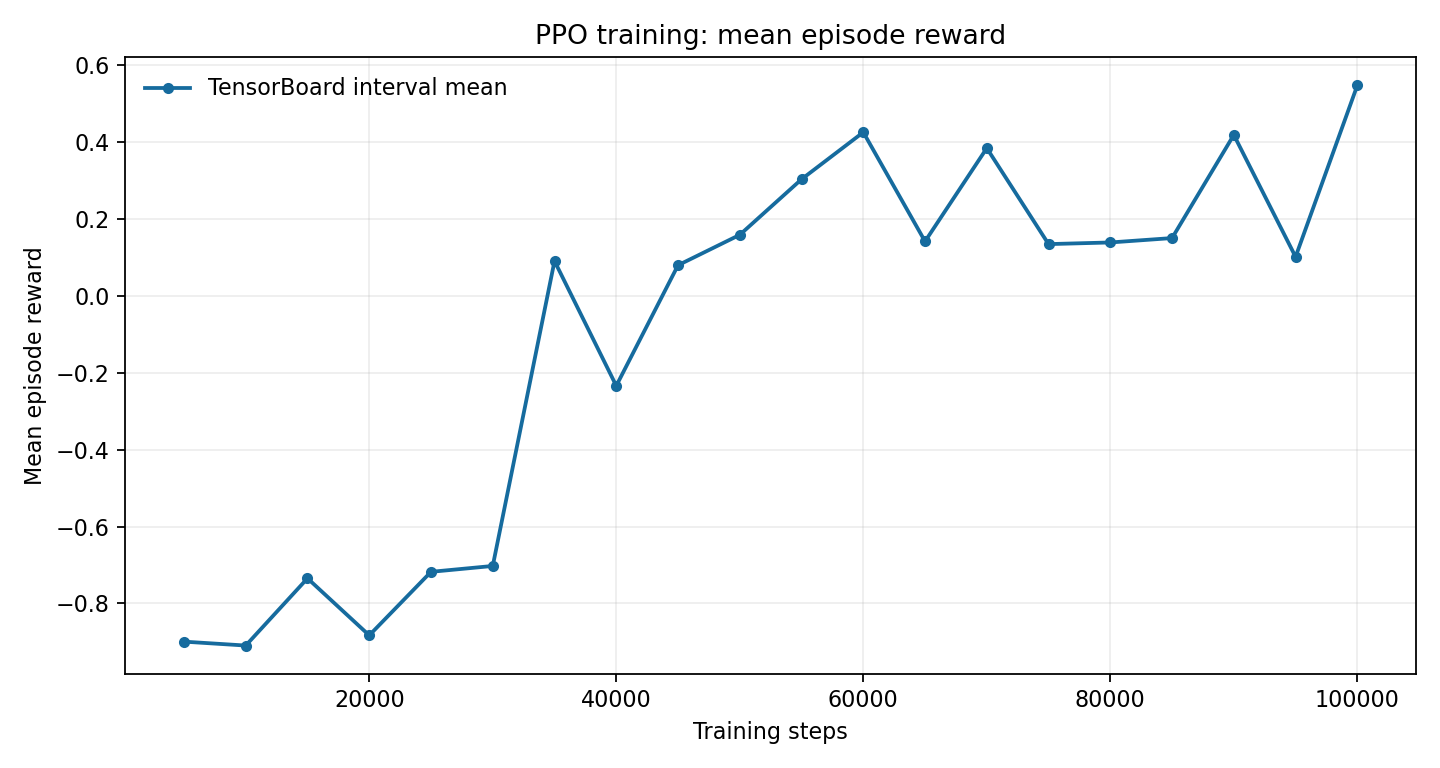
Figure 2. Reporting-window mean reward extracted from the actual TensorBoard log. Reward improved overall, but the later windows still fluctuated.
The mean reward increased by approximately 1.446 between the first and last reporting windows.
The first four reward windows averaged approximately -0.857, compared with +0.304 for the last four. This supports overall progress without relying only on the most favorable final point. The negative full-run mean includes failures while the policy was still learning; it is not the final model’s independent test score.
However, the reward curve still showed fluctuations, and the longer episode duration did not necessarily mean faster target capture.
A longer episode could also indicate that the agent had learned to avoid leaving the arena without consistently reaching the target.
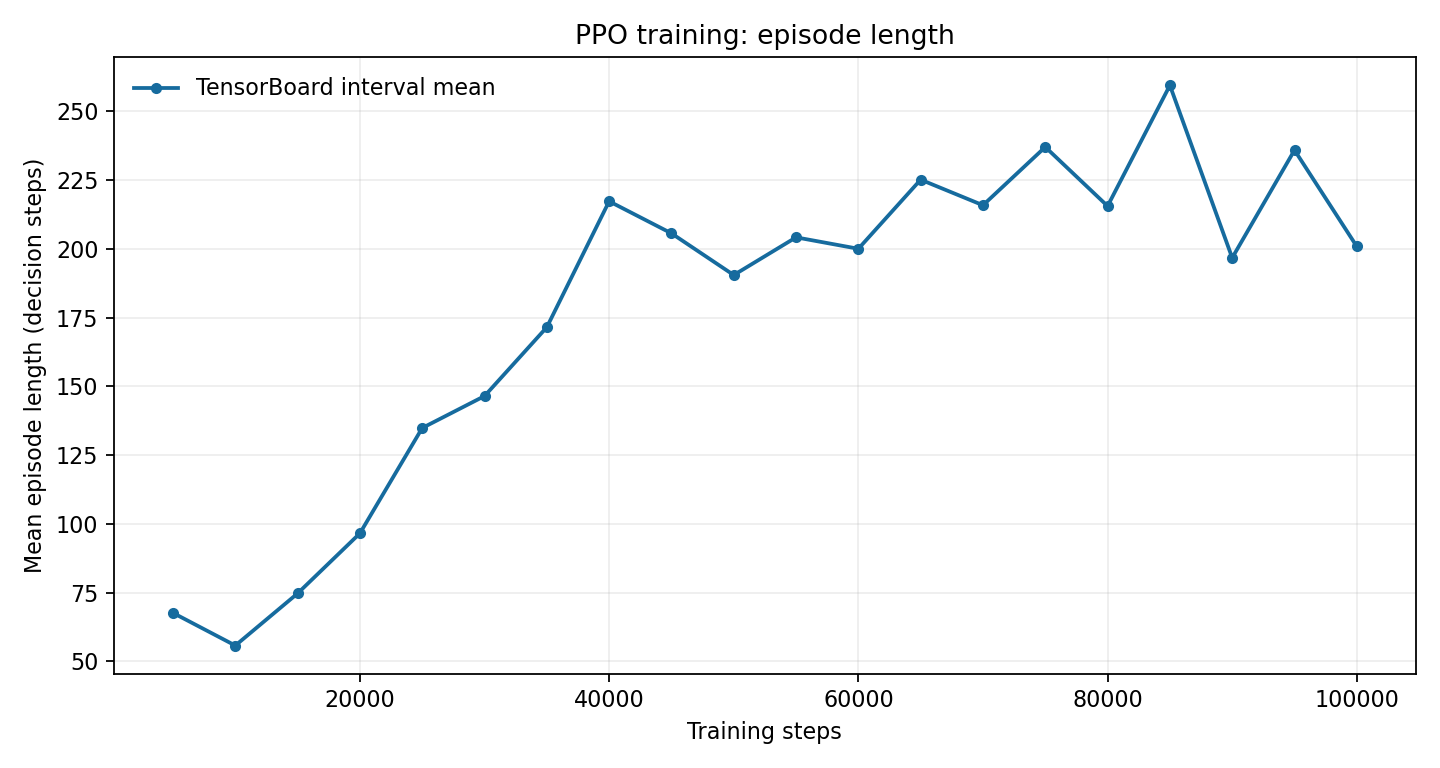
Figure 3. Episode length in decision steps. Longer episodes may indicate fewer early boundary failures rather than faster target capture.
The training log recorded 679 completed episodes: 302 captures, 312 boundary failures, and 65 timeouts. These totals mix early and late policies. They are not a substitute for testing the exported model independently.
Therefore, an independent evaluation was necessary.
12. Independent Evaluation Link to heading
12.1 Evaluation Method Link to heading
The final MovingTargetAgent-100024.onnx file passed the ONNX checker and was loaded in a separate evaluation Player for deterministic CPU/Burst inference.
Four control strategies were compared:
- Random actions.
- Remaining stationary.
- A manually designed pursuit controller.
- The trained PPO policy.
Each strategy was evaluated over 100 episodes using test seed 20261107, separate from training seed 42. The arena, movement rules, spawn separation, capture distance, and episode limit were unchanged. Evaluation used time scale 50, but capture durations are simulated seconds derived from physics steps, not wall-clock execution time.
The random controller sampled horizontal actions, the stationary controller supplied zeros, and the handwritten pursuit controller used relative position and current velocity to steer toward the target. The last controller is a reference solution, not a learned policy.
Capture rate and average capture time were recorded.
12.2 Evaluation Results Link to heading
| Strategy | Capture rate | Mean capture time for successful episodes |
|---|---|---|
| Random actions | 7% | 4.07 s |
| Stationary | 33% | 20.68 s |
| Handwritten pursuit controller | 100% | 1.79 s |
| Trained PPO | 48% | 18.81 s |
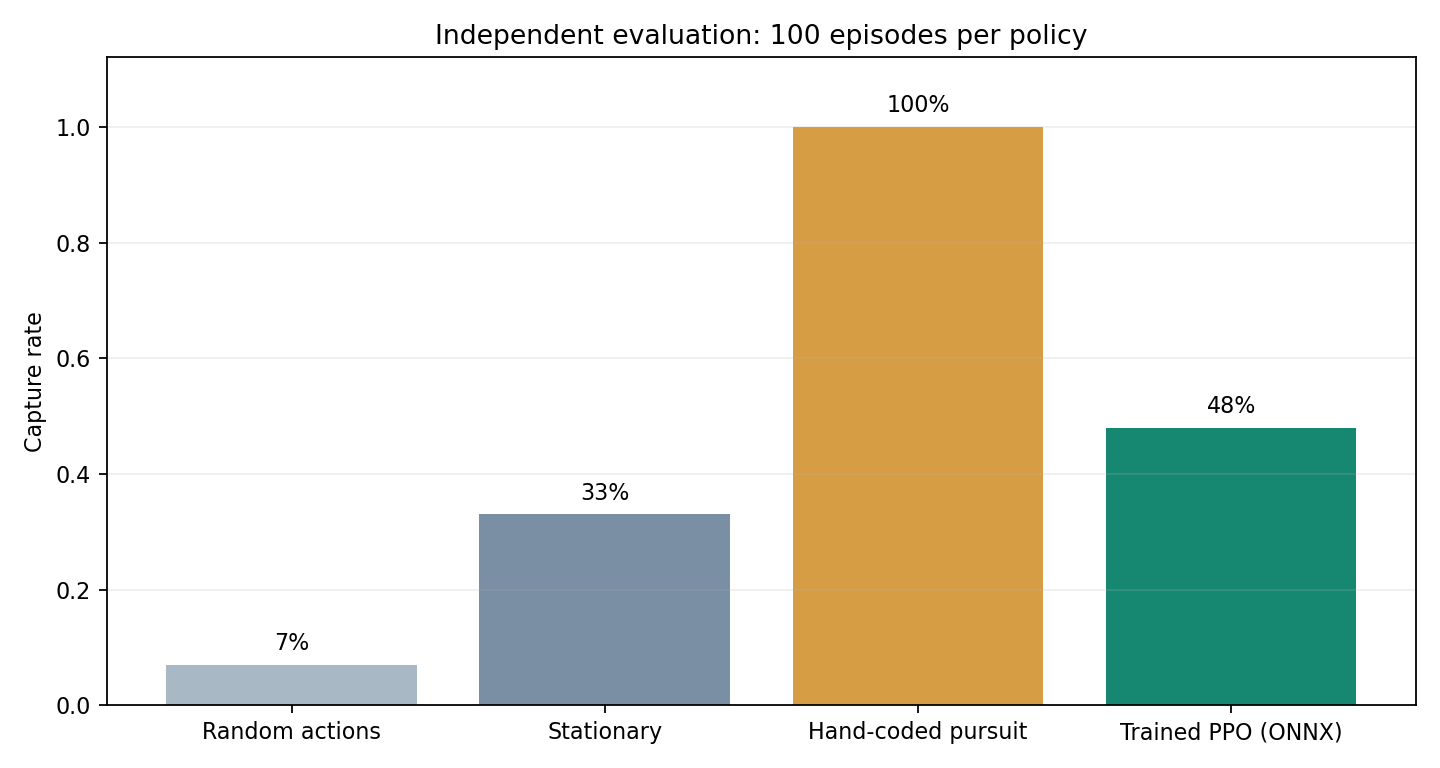
Figure 4. Independent evaluation. PPO exceeded the random and stationary baselines in this test, but remained far below handwritten pursuit.
The trained PPO policy achieved a capture rate of 48%.
This was higher than both the random-action baseline and the stationary baseline.
However, it was substantially worse than the handwritten pursuit controller, which achieved a 100% capture rate and much shorter capture times.
Of the 100 PPO evaluation episodes, 52 ended because of the time limit rather than target capture. None ended because the agent left the arena.
The capture-time averages include successful episodes only and must be interpreted together with capture rate. Random actions appear fast only among seven successful episodes; the other 93 episodes ended outside the arena. That conditional average does not make random control a better pursuit strategy.
The PPO model’s mean reward over independent test episodes was -0.147. This is different from the final training-window mean of +0.547: training sampled exploratory actions, evaluation was deterministic, and the test seed differed. The two metrics cannot be used interchangeably.
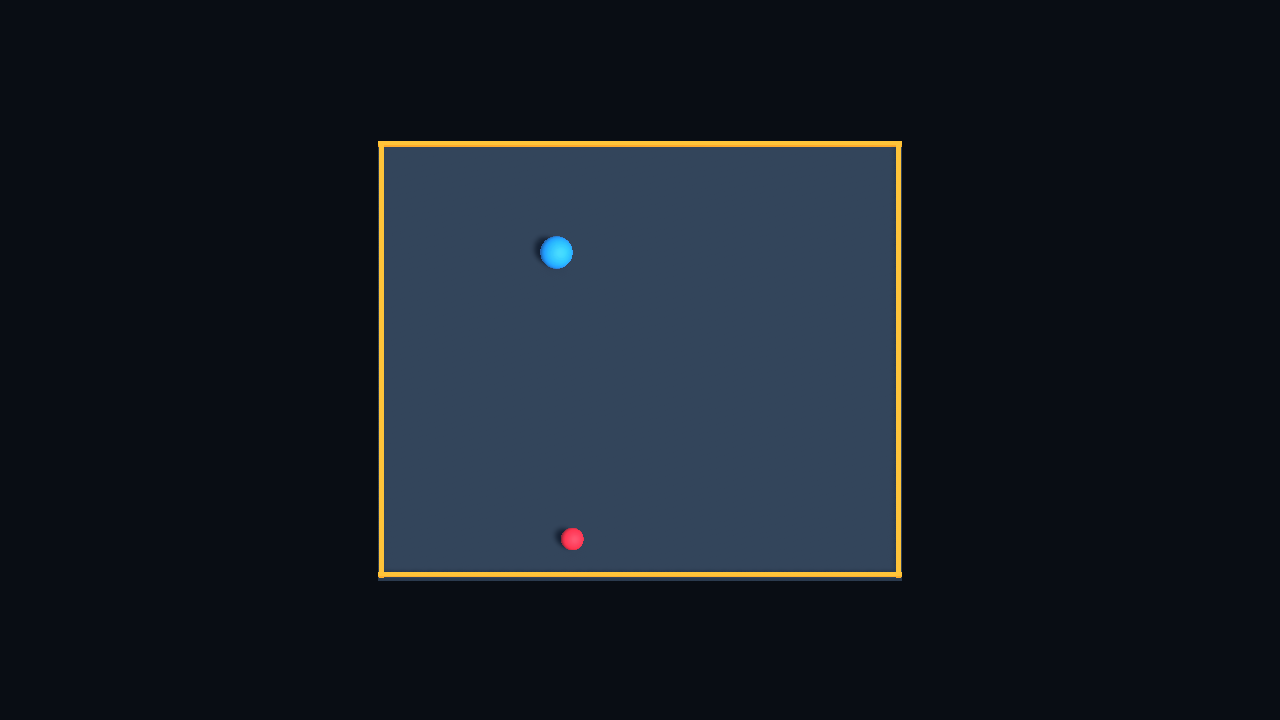
Figure 5. A real runtime frame after loading the trained ONNX model. A single screenshot confirms rendering and execution, not pursuit quality.
13. Discussion: Why Was the Learned Policy Not More Effective? Link to heading
13.1 Improvement in Reward Does Not Guarantee Efficient Pursuit Link to heading
The PPO policy demonstrated improvement in mean training reward.
However, its independent capture rate remained below 50%.
This difference illustrates an important characteristic of reinforcement learning: maximizing the defined reward does not always produce the behavior that a human observer considers most effective.
The observed outcome is consistent with reducing penalties without fully solving the intended task. It does not, by itself, prove a particular reward exploit.
13.2 Conservative Movement as a Possible Explanation Link to heading
The trained agent completed all evaluation episodes without crossing the arena boundary.
This suggests that it learned to avoid at least one major source of negative reward.
At the same time, its relatively low capture rate and long successful capture times suggest that it did not develop an efficient pursuit strategy.
One possible explanation is that the policy became conservative, prioritizing survival inside the arena over aggressive pursuit.
This interpretation is consistent with the evaluation results, but further trajectory analysis would be needed to confirm the exact movement pattern.
13.3 Why Did the Stationary Baseline Capture 33%? Link to heading
The stationary baseline’s 33 captures are important because success can occur without active pursuit. The implementation supplies a concrete mechanism: the stationary controller returns zero actions, episode reset clears the agent’s velocity, gravity is disabled, and the target collider is a trigger rather than an object that pushes the agent. Meanwhile, the target keeps moving at 1.5 units per second and reflecting inside the arena.
Capture depends only on relative distance. If the target enters the 0.95-unit capture region around the stationary agent, the episode succeeds regardless of which object closed the gap. The minimum initial separation prevents immediate capture, but does not prevent a later passive capture. Over a full 40-second episode the target can travel approximately 60 units along its reflected path.
The logs establish 33 captures and 67 timeouts, with a mean successful capture time of 20.68 simulated seconds. The code establishes how passive capture is possible. Neither establishes that every target path will reach every stationary position or that 33% is a general probability. No ablation study quantified the separate effects of arena geometry, direction, capture radius, and time limit.
The same observation matters for reward interpretation: distance can decrease because the target approaches, even if the agent contributes no pursuit action. Comparing only against random actions would therefore exaggerate the evidence for purposeful tracking. The stationary baseline provides a more informative reference.
13.4 Limitations of the Experiment Link to heading
The experiment has several limitations.
First, the policy was trained using one training seed and evaluated using one independent test seed. Additional runs would be necessary to assess reproducibility. The 100-episode comparison does not establish cross-seed stability or statistically robust superiority over the stationary baseline.
Second, the initial budget allowed roughly ten buffer-sized collection cycles. That may have restricted learning, but a longer run is not automatically the correct remedy.
Third, the evaluation did not include detailed trajectory analysis, so the precise reasons for inefficient pursuit remain uncertain.
Finally, reward design and action-selection differences may contribute to the gap between training and testing. Revising the reward would be a new experiment; the current results do not identify a proven single cause of the limited performance.
Possible future improvements include analyzing action trajectories, revising the reward structure, testing additional random seeds, and comparing alternative PPO configurations.
These improvements were not performed in the present experiment.
14. Technical Outcomes and Lessons Learned Link to heading
This experiment provided practical experience in several areas.
Unity environment development: A custom interactive environment was created using C# scripts, physics components, and ML-Agents behavior configuration.
System integration: The Unity Editor, Unity ML-Agents package, Python environment, and training process were configured and tested together.
Debugging and validation: Compilation, Editor validation, runtime testing, communication testing, and independent evaluation were treated as separate verification stages.
Reinforcement learning: The experiment demonstrated how observation design, action spaces, reward functions, and PPO training influence learned behavior.
Experimental evaluation: Comparing the trained model against multiple baselines revealed limitations that were not apparent from the training reward curve alone.
The most important lesson was that a successful training process and an improving reward curve do not necessarily imply that the agent has learned an efficient solution.
15. Overall Conclusion Link to heading
HCI Lab 1 provided experience with two different but complementary technical workflows.
The Hugo activity focused on website development, content organization, deployment, and troubleshooting configuration errors. The final result was a functional academic blog suitable for publishing HCI coursework.
The Unity ML-Agents activity focused on interactive environment design, reinforcement learning, and experimental evaluation.
The Moving Target Challenge environment was successfully implemented, and Unity–Python communication was verified.
A PPO model was trained for 100,024 steps, exported to ONNX, and evaluated against three baseline strategies.
The model showed measurable learning progress, with mean training reward increasing from −0.899 to +0.547 between the first and last reporting windows.
Nevertheless, its independent capture rate of 48% showed that the learned behavior was not yet consistently effective.
Overall, the laboratory demonstrated not only how to implement and test interactive systems, but also why careful debugging, appropriate baselines, and critical interpretation of experimental results are essential.
The experiment achieved its implementation and training objectives while identifying clear limitations and directions for future improvement.
References and Reproducibility Link to heading
- Hugo front matter documentation.
- Official Unity ML-Agents 4.1.0 package definition.
- Pinned Python trainer version source.
- Official Unity URP render-request documentation.
The source measurements are retained in experiment_20261107_210808: the communication probe, exact trainer arguments and exit status, TensorBoard scalar export, per-episode JSONL records, evaluation CSV, model checksum, and source/configuration snapshot. All figures above come from these measurements or actual Unity rendering. No illustrative replacement screenshots or invented training values were used.